Your photo desk fits in your pocket.
File before you leave the venue. Import, cull, caption, and send — no laptop, no app-hopping.
Pull just the frames you want off your SD card, rate and pick fast, caption a whole take with one voice memo, and deliver to FTP, email, or your editor in a single send.
- Leave the laptopDo the whole filing job on the iPhone already in your bag.
- One app, not fiveCamera roll, notes, IPTC editor, and FTP client in one place.
- Get the hour backSkip the post-shoot shuffle that eats an hour a day at a desk.
Built for photographers who deliver on a deadline. Weddings, events, sports, press, and photojournalism. If you shoot in the field and someone is waiting on the files, this is for you.
iPhone only · iOS 26 · works on the SD cards and cameras you already carry.
From card to client without opening a laptop.
The whole job — import, cull, caption, send — runs on one device, in the order you already work. Four steps, no desk required.
- 01
Import everything, or just your picks
Pull photos straight off your SD card or a folder. Bring in every frame, or filter to the ones you rated or flagged in camera so the rest never clog your phone. Skip the throwaways before they ever land on your phone.
- 02
Cull at speed
Star ratings, flags, and picks in a quick grid. Filter by file type (RAW or JPEG) and by rating so your selects are one tap away.
- 03
Caption the whole take
Say it once. A single voice memo writes clean IPTC captions across the whole batch — every file ready to file, none typed by hand. Your byline, credit, and rights drop in from a saved preset — no field-by-field typing.
- 04
Send it anywhere
Deliver to FTP, email, your editor, or post to social — straight from the app, in one send you can reuse next time.
Less time filing. More time shooting.
A working photographer can lose an hour a day to the post-shoot shuffle. Dispatches gives that hour back — and gets your work out faster. Tap through one real job, screen by screen.
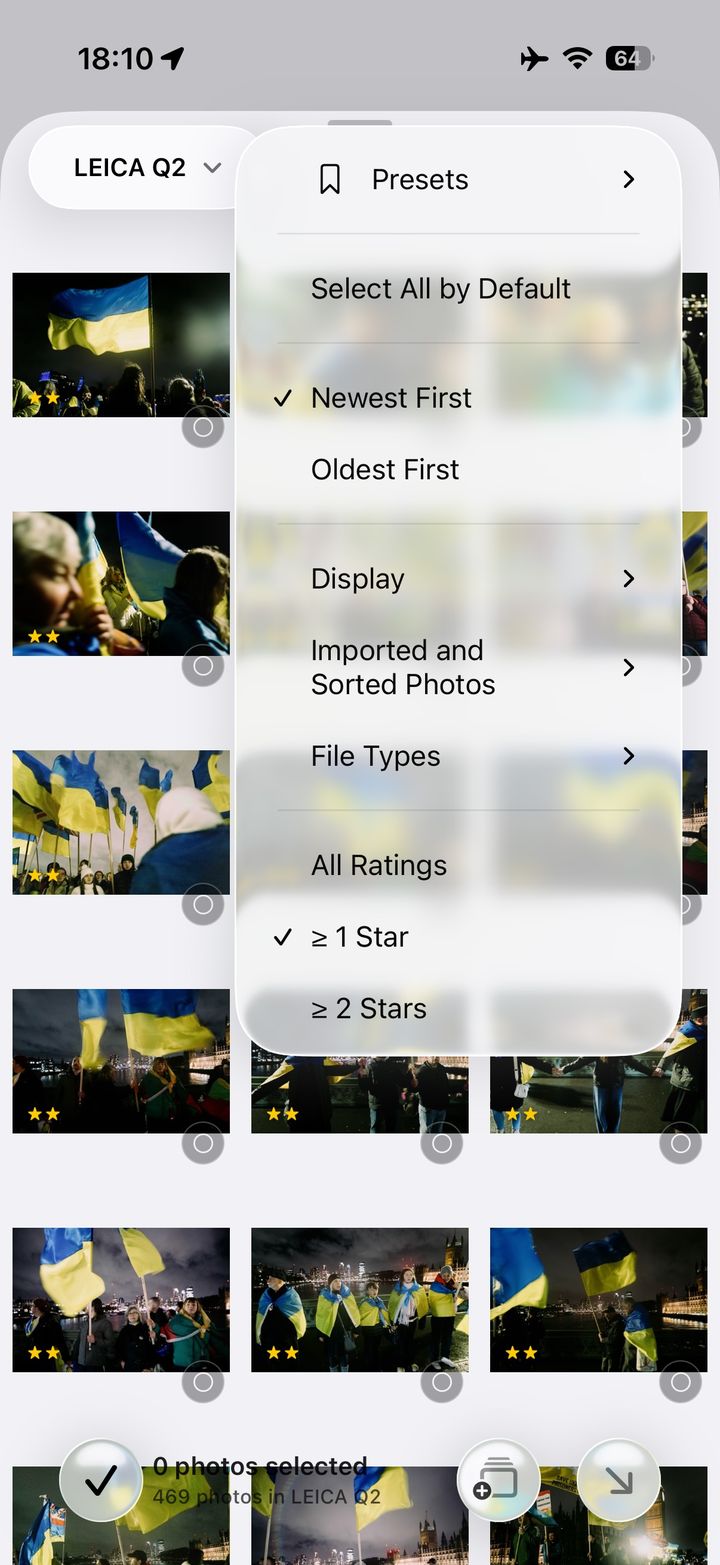
Pull in from the card
Plug in the SD card and bring in every frame, or only what you rated or flagged in camera. Then send your picks to an event.
Tap the glowing ring on the phone, or press Next.
Want the whole thing spelled out, tap by tap? Read the step-by-step guide — setup, import, culling, captions, workflows and sending, in ten steps.
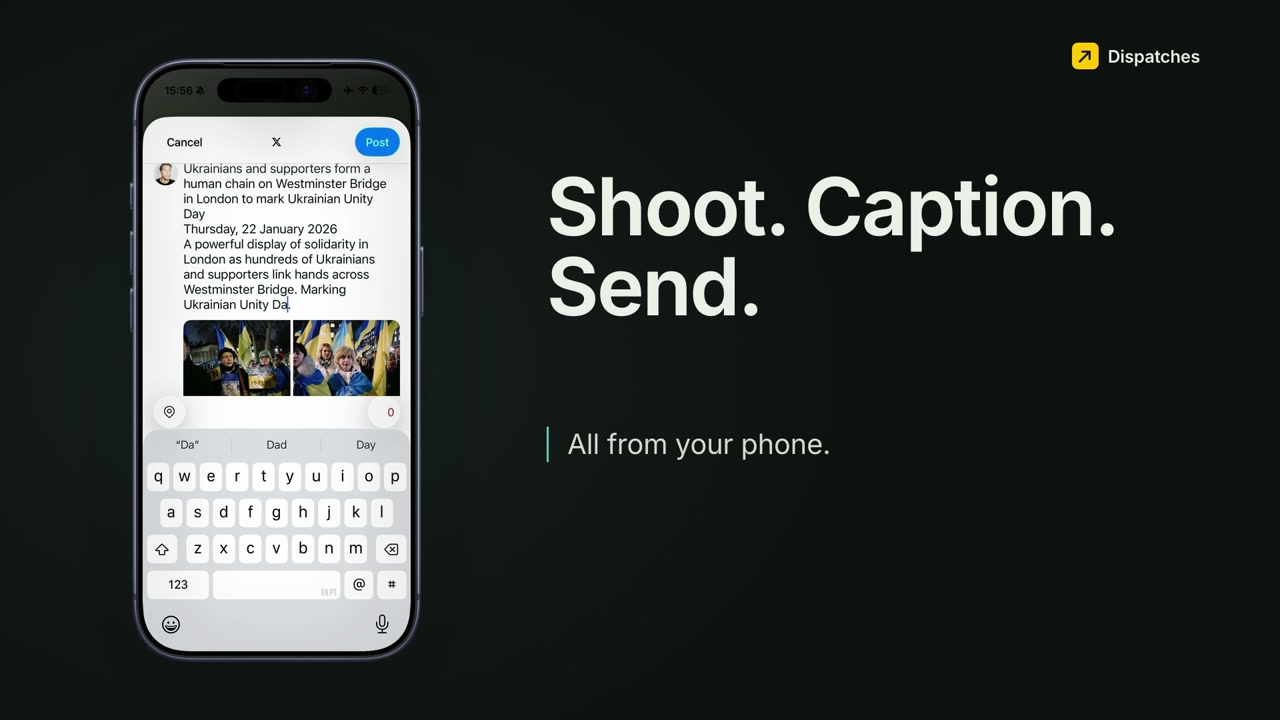 Play the 2-minute walkthrough
Watch a real job, card to agency, in two and a half minutes.
One assignment filed from an iPhone: off the SD card, captioned, culled, then sent to the agencies' FTP servers and handed to social.
One app where you used to need five.
Everything between the shutter and the send, in a workflow built for the field — not a stripped-down version of a desktop app.
Edit, RAW included
Non-destructive tone, crop, straighten, Looks and Auto-Tone on RAW and JPEG. Your originals stay untouched.
Shoots sort themselves
Photos group into events and link to your calendar, so several jobs in one day stay apart.
Metadata presets
Save your byline, credit, copyright, and contact once. Apply a full IPTC preset to a whole shoot in a tap, then tweak per photo if you need to.
Send straight to FTP
Deliver to FTP, your editor, email, Files, or social without leaving the app. Save a send once and reuse it for every job after.
RAW and JPEG kept as pairs
Filter the grid to either, and choose exactly what gets delivered.
Know what filed
Retry and resume, delivery history and receipts for every send.
Yours stays yours
Everything imports to your phone first. Your photos only move when you send them, and richer AI captions are an option you turn on — never the default.
Client Galleries
Optional add-on: a private, expiring web link where a client views and downloads the set.
For photojournalists and field press.
Made with freelance photojournalists, agency stringers, sports shooters, and pool photographers — the people who cover events for a living and file on a deadline. The workflow assumes deadline pressure, patchy signal, and an editor expecting clean captions on the first send.
- On scenePull every frame, or just the rated ones, off the card and keep the shoot together as one event.
- On the moveCaption the take by voice, drop in your byline and rights from a preset, fix the few that need it.
- Before you leaveFire one send to the desk over FTP or email, and watch it go through — retry the stragglers.
One price. The whole app.
No tiers, no maze. One subscription unlocks the whole workflow — import, cull, caption, and send. Start with a 14-day free trial and pay only if it earns its place on your next shoot.
14-day free trial. Billing and cancellation are handled by Apple. Client Galleries and extra AI Event Briefs are optional add-ons.
- Everything in Dispatches — every destination, preset, and saved send, no feature gating
- Import everything or just your picks, cull and filter, caption a whole take by voice
- Send to FTP, email, your editor, or social — and reuse the send next time
- 50 AI Event Briefs included every month — top up with credit packs anytime if you need more
Straight answers before you commit.
The questions working photographers ask before putting a new app in the middle of a paid job. More on the support page.
Does it replace Lightroom or my desktop editor?
For filing from the field, yes. Dispatches covers the whole job on the phone: import, cull, edit (RAW files included), caption and send. What it replaces is the laptop-and-five-apps shuffle between the shoot and the send. See how it fits alongside Lightroom and Photo Mechanic.
What happens to my RAW files?
They're kept. Shoot RAW+JPEG and Dispatches keeps the RAW alongside its JPEG as a pair. You can filter the grid to work with just RAW or just JPEG, and choose exactly what gets delivered when you send.
Is my data safe — what actually leaves my phone?
Your photos import to your iPhone and only move when you send them. Raw photo bytes and raw voice audio never leave the device. Online captioning for richer AI Event Briefs is an optional toggle — off by default — that sends only event text, your notes, and the event's location and date/time; switched off, captions are drafted on-device. Full breakdown in the Privacy Policy.
Do I need a laptop?
No. The whole workflow — card import, culling, captions, delivery — runs on the iPhone already in your bag, with the card reader you already carry. Dispatches is an iPhone app for iOS 26 today — Mac, Windows and Android versions are in development. There's no iPad or web version.
What does it cost?
One subscription, everything included — no tiers, no feature gating. It starts with a 14-day free trial, then £2.99/month in the UK, €2.99/month in Europe, or $5.99/month in the US. 50 AI Event Briefs are included every month, with optional credit packs if you need more. Billing and cancellation are handled by Apple.