How to write a photo caption
A good caption lets an editor publish your picture without calling you. It answers five questions in two sentences, in an order every picture desk recognises. Here is that structure, with real examples and the mistakes that get captions rewritten.
Say who is in the picture, what they are doing, where and when, then why it matters. Write the first sentence in the present tense about what the photo shows, with the place and date; write the second in the past tense with the background. Name only people you have confirmed, and check every fact.
The five questions
Every news caption answers the same five questions. If one is missing, an editor has to find it, and on deadline they may not bother.
- Who is in the picture, with full names where they are identifiable and confirmed.
- What they are doing, in the moment the photo shows.
- Where: specific enough to find on a map (venue or street, city, country).
- When: the date, and the day of the week if your desk uses it.
- Why it matters: the news, the occasion, the context.
The two-sentence structure
Wire agencies and newspapers broadly use the same shape:
- Sentence one, present tense: what the photo shows, who, and where and when. "Supporters form a human chain…", not "formed".
- Sentence two, past tense: the background the reader needs. "The event marked…".
The present tense keeps the reader in the moment of the picture; the past tense marks everything around it. Each agency has its own style guide for the details (date formats, the order of place names, whether to include the day of the week), so check yours, then build those rules into your preset once.
Examples
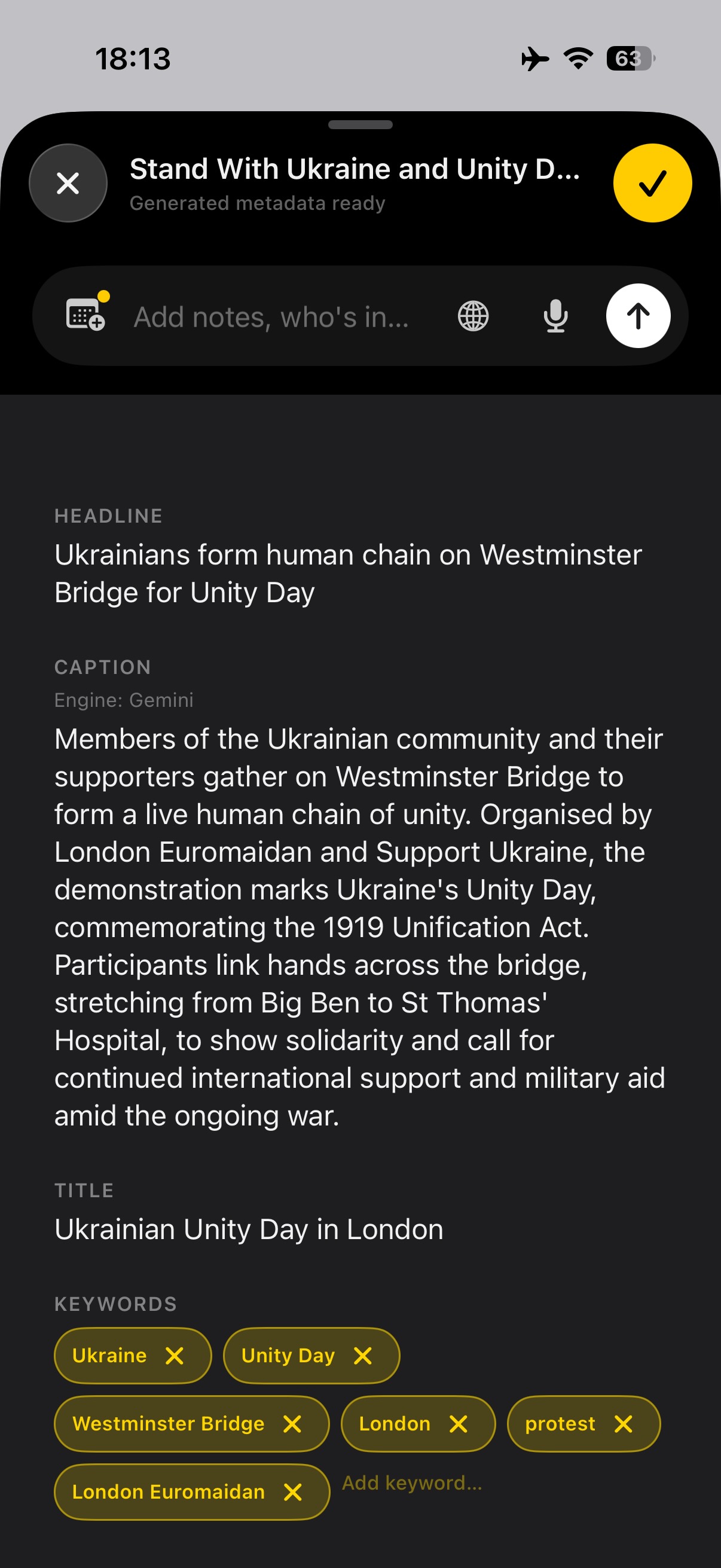
From a job on Westminster Bridge, which is also the job in this field note and this video:
Protest in London today.
Ukrainians and supporters form a human chain on Westminster Bridge in London to mark Ukrainian Unity Day, Thursday, 22 January 2026.
Ukrainians and supporters form a human chain on Westminster Bridge in London to mark Ukrainian Unity Day, Thursday, 22 January 2026. Unity Day commemorates the 1919 Unification Act, which joined the Ukrainian People's Republic and the West Ukrainian People's Republic.
The weak version answers almost nothing: "today" is meaningless once the file is archived, and "protest" doesn't say about what. The desk-ready version answers all five questions and can run without a phone call.
A sports example follows the same shape: "Jane Smith of Example FC celebrates scoring the opening goal against Sample United during the league match at Example Park, London, Saturday, 3 October 2026." Then a past-tense sentence with the result, if you have it when you file.
Naming people
- Full name and a short identifier the first time: "Labour MP Jane Smith", "Example FC striker Jane Smith".
- Several people: name them in order, usually "from left", and say so.
- Only name who you've confirmed. Ask, check a programme or a team sheet, or describe them instead ("a protester"). A wrong name is worse than none.
- Spell it the way they spell it. Check accents and transliterations.
- Think before naming people at sensitive events, such as protests, minors and victims, and follow your outlet's policy.
Mistakes that get captions rewritten
- Relative dates like "today", "yesterday" or "this morning". Archives keep the caption forever; use the date.
- Describing the obvious. "A man holds a flag" when the reader can see that. Add what they can't see: who, and why.
- Guessing a name, a number or a cause. If you don't know, leave it out or say it's unconfirmed.
- Opinion. "A powerful display" belongs in a social post, not the wire caption.
- The same caption on every frame when the frames show different people or moments. Share the context, and add specifics per frame.
- No credit or byline in the file. The caption is only part of it; see IPTC metadata on iPhone.
Captioning a whole shoot faster
Most of a take shares one context: the event, the place, the date, the why. Only the "who" and "what" change from frame to frame. So write the shared part once and add the per-frame part only where it's needed.
That's how captioning works in Dispatches. You describe the job once in a brief, typed or spoken, optionally starting from the calendar entry for the assignment. It drafts the headline, caption, keywords and location; you correct them and apply them to the whole event as IPTC. For frames with a specific person or moment, you add a caption prefix, and the final caption is that prefix followed by the shared caption. The draft is a starting point: you still check every name and fact before it goes.
Keep reading
- TutorialIPTC metadata on iPhonePut the caption, byline and credit inside the file.
- TutorialSend photos to FTP from an iPhoneGet the captioned frames to the desk.
- GuideCaption the whole takeThe brief, step by step.
Caption once, file everything
Dispatches is on the App Store for iPhone (iOS 26 or later), with a 14-day free trial.